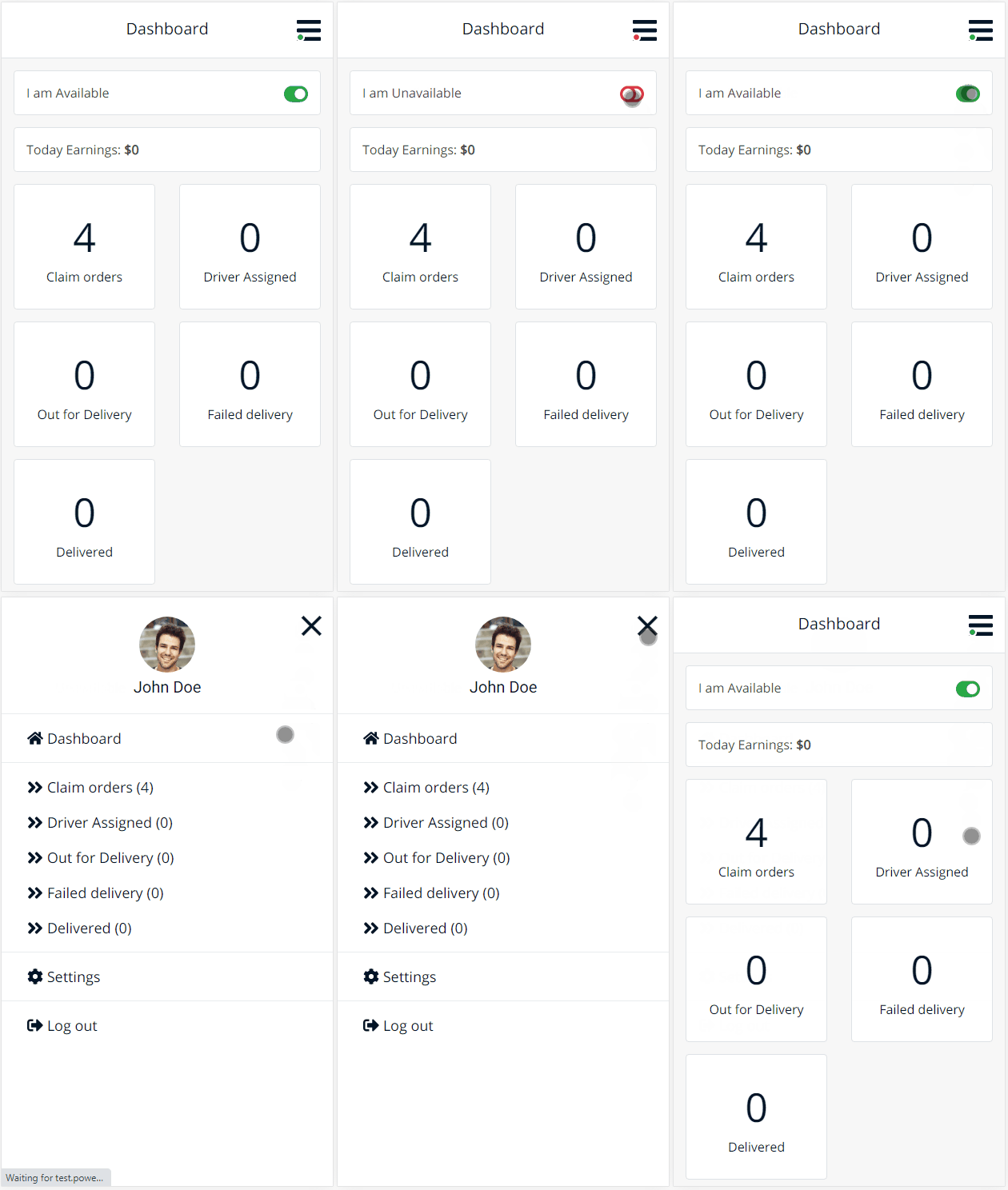
The Delivery Drivers Dashboard is the mobile-first interface built specifically for delivery drivers using the Local Delivery Drivers for WooCommerce Premium plugin. From this panel, drivers can manage their availability, monitor deliveries, and take real-time actions right from their phone.
Dashboard Overview
Dashboard in Action

The dashboard includes order counters, claimable orders, an availability toggle, and a slide-out menu optimized for mobile.
Availability Toggle
Drivers can update their daily work status with a single tap:
- Available – Ready to be assigned or claim new orders
- Not Available – Hidden from auto-assign and claim queues
Availability status directly affects whether a driver receives or can claim orders.
Track Me Toggle
Enables or disables live map tracking of the driver’s location within the driver panel. Location is shared only when the toggle is enabled and the driver is actively using the panel.
Today’s Earnings
Shows the total value of all orders delivered by the driver today. Updates automatically when new orders are marked as Delivered.
Order Status Counters
Drivers can view a real-time summary of orders by status:
- Assigned
- Out for Delivery
- Delivered
- Failed
Each status is color-coded and tap-to-access for quick filtering.
Claim Orders (If Enabled)
If order claiming is enabled by the admin:
- A Claim Orders tab appears in the dashboard
- Drivers can browse and claim unassigned orders that meet location rules
- Claims update instantly and are confirmed with visual feedback
Mobile Slide-Out Menu
The dashboard menu opens by tapping the menu icon (☰) in the header. It includes:
- Driver Avatar (if enabled)
- Assigned Orders
- Out for Delivery
- Delivered Orders
- Failed Deliveries
- Claim Orders (if enabled)
- Profile
- Logout
📌 This menu uses a full-width slide-in animation and is optimized for touch interactions.
Profile & Avatar (Optional)
If profile images are enabled:
- The avatar appears inside the menu drawer
- Drivers can tap Profile to view or edit personal details
Profile images are managed through WordPress user settings.
Admin Notes
- Only users with the Delivery Driver role can access the dashboard
- Claim rules, availability settings, and profile visibility can be configured from:
Plugin Settings > Drivers Settings - Admins should log in with a separate test driver account to preview the dashboard
Summary
The driver dashboard gives your delivery team everything they need to work efficiently:
- Live order stats
- One-tap availability control
- Order claiming
- Mobile navigation
- Profile and logout access
All in a fast, touch-friendly layout ready for drivers on the move.